The California Desert Association of REALTORS® and FLEXMLS are launching a new photo privacy option for listings. Photos Marked Private While Off-Market is a new feature launching in FLEXMLS on May 1, 2025.
The new photo privacy options allow you to restrict photos from public view without removing them permanently from a listing. Private photos cannot be viewed via the consumer portal, subscription emails, shared links, or public versions of reports. Marking the photos as private will restrict access to only members of the MLS and will no longer feed out to IDX sites.
Photo privacy options allow you to restrict photos from public view without removing them permanently from a listing. Private photos cannot be viewed via the consumer portal, subscription emails, shared links, or public versions of reports. Private photos are available only to MLS members who are viewing listings in FLEXMLS. For users who can view them, private photos are indicated with a red Private tag. Remember, the primary photo for the listing CANNOT be made private.
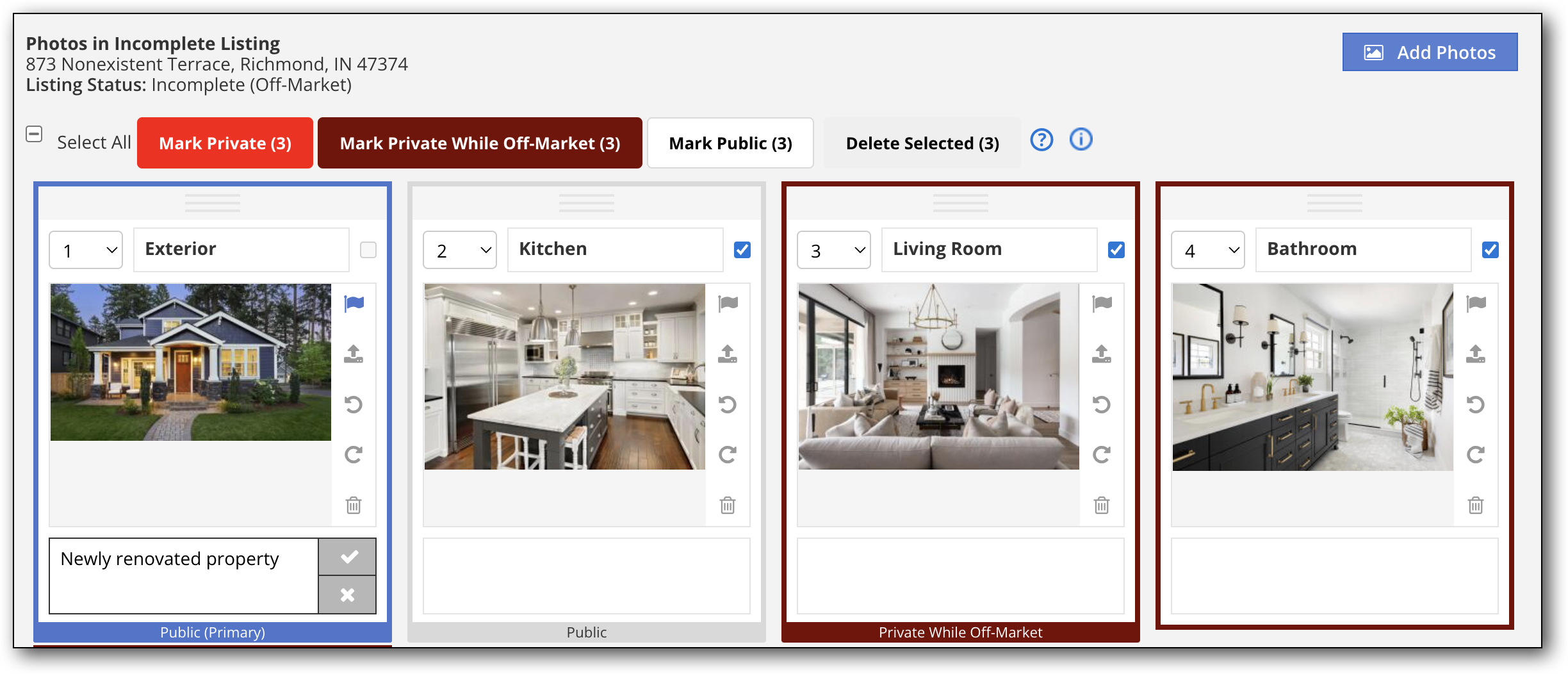
You can specify that a photo is always private, or you can set photo privacy to change automatically based on listing status.
Photos that have been marked private are outlined in red, with the label Private. Photos that have been marked private while off-market will appear with a dark red outline and the label Private While Off-Market. Photos that do not have privacy restrictions are labeled Public.
Note that private photos can be copied, but they will not automatically be marked private on the destination listing.
This tutorial video from the FLEXMLS team will walk you through how to make photos, videos, and virtual tours private and how to connect privacy to listing status.